


The Ultimate Guide to Choosing a Laptop for Your Home Office: Features to Consider
In today’s digital age, working from home has become increasingly common. The transition from traditional office spaces to home offices requires not only a shift in mindset but also the right tools to ensure productivity and efficiency. One of the most crucial tools is a reliable laptop. Choosing the right laptop for your home office involves considering a range of features. This comprehensive guide will help you make an informed decision.
1. Determine Your Usage Needs
Before diving into specifications, it’s essential to understand your specific needs. Are you a graphic designer requiring high-end processing power and a vivid display, or are you a writer who primarily needs a comfortable keyboard and long battery life? Identifying your primary use will guide your decision-making process.
For instance, graphic designers might prioritize color accuracy and GPU performance, whereas professionals in finance might need a laptop with robust security features.
2. Key Specifications to Consider
Once you have a clear understanding of your needs, you can start evaluating the key specifications that will impact your laptop’s performance.
Processor (CPU)
The processor is the brain of your laptop. It’s vital to select a CPU that can handle your workload. For most users, an Intel Core i5 or AMD Ryzen 5 will suffice. However, if you’re running complex software or multitasking heavily, consider an Intel Core i7 or AMD Ryzen 7.
Memory (RAM)
RAM is crucial for multitasking. For general office tasks, 8GB of RAM is typically adequate. However, if you work with data-heavy applications or virtual machines, 16GB or more might be necessary. More RAM ensures smoother performance and the ability to run multiple applications simultaneously.
Storage
Decide between a Solid State Drive (SSD) and a Hard Disk Drive (HDD). SSDs are faster and more reliable, making them ideal for quick boot times and application launches. At least 256GB SSD is recommended for most users. If budget allows, a combination of SSD for the operating system and HDD for storage is optimal.
Graphics Card (GPU)
A dedicated GPU is essential for tasks such as video editing or gaming. However, for basic office tasks, an integrated GPU, which shares memory with the CPU, is generally sufficient.
3. Display Quality
Your laptop’s display is your window to work, so it’s important to choose one that meets your needs in terms of size, resolution, and quality.
Size and Resolution
A larger screen provides a more comfortable viewing experience but can compromise portability. A 13 to 15-inch display is a sweet spot for most users. When it comes to resolution, Full HD (1920×1080) is usually adequate, although 4K displays offer greater detail and are beneficial for tasks that require precision, such as video editing.
Panel Type
Consider the panel technology used in the screen. IPS panels offer better color accuracy and viewing angles compared to TN panels. This is crucial for creative professionals who need consistent color reproduction.
4. Battery Life
Battery life is an important consideration for home office laptops, especially if you prefer working from different spots around your home. Look for laptops that offer at least 8 hours of battery life for a full day’s work without needing to recharge.
Brands like Lenovo and Dell often provide laptops with superior battery performance, allowing you to focus on your work rather than constantly searching for a power outlet.
5. Build Quality and Portability
While working from home may not require the same level of portability as traveling for work, a lightweight and durable laptop can still be beneficial.
Material and Durability
Laptops with aluminum or magnesium alloy bodies tend to be more durable and provide a premium feel. If you’re prone to occasional drops or spills, consider models with reinforced designs or spill-resistant keyboards.
Weight
If you like to move around your house while working, consider the weight of the laptop. Ultrabooks are designed to be lightweight without sacrificing performance, making them an excellent choice for remote work.
6. Connectivity and Ports
A versatile range of ports can greatly enhance your laptop’s functionality. Ensure that the laptop you choose has enough USB ports, an HDMI output for connecting to external displays, and an SD card reader if you frequently work with cameras.
USB-C is becoming increasingly popular due to its versatility, offering charging, data transfer, and video output capabilities. Laptops like the MacBook Pro have embraced USB-C as the primary connectivity option.
7. Operating System
Your choice of operating system (OS) can influence the software you can use and the overall user experience. The three main options are Windows, macOS, and Linux.
Windows
Windows is the most versatile OS, compatible with a broad range of software and hardware. It’s often the best choice for those who need flexibility and compatibility with industry-standard applications.
macOS
macOS is known for its intuitive user interface and seamless integration with other Apple products. It’s a preferred choice for creative professionals due to its reliability and the availability of specialized software.
Linux
Linux is an open-source OS that offers a high degree of customization. It’s favored by developers and IT professionals who require a highly configurable environment.
8. Price and Warranty
Finally, consider your budget. While it’s tempting to opt for the latest and greatest, ensure that you’re investing in features that align with your actual needs. Mid-range laptops often provide the best balance between cost and performance.
Check the warranty and support options. Brands like HP and ASUS offer extensive warranty packages, which can be a lifesaver in case of hardware failures.
Takeaways
Choosing the right laptop for your home office is an investment in your productivity and comfort. By carefully considering your usage needs, key specifications, display quality, battery life, build quality, connectivity, operating system, and price, you can find a laptop that enhances your remote work experience.
For more insights on optimizing your home office setup, you might explore guides on home office desks and ergonomic chairs to complement your new laptop and create a productive workspace.
9. Additional Features to Consider
Beyond the core specifications, there are additional features that can enhance your user experience and provide added convenience.
Keyboard and Trackpad
For those who spend a significant amount of time typing, a comfortable keyboard is crucial. Look for keyboards with good key travel and feedback. Backlit keyboards can also be a great addition for working in low-light conditions.
The trackpad is another important component. A responsive and accurate trackpad can improve your workflow. Apple’s MacBook series is renowned for its excellent trackpads, which offer precise control and multi-touch gesture support.
Webcam and Microphone
With the rise of video conferencing, having a good quality webcam is more important than ever. Integrated webcams with at least 720p resolution are common, but if your work involves frequent online meetings, you might consider laptops with 1080p webcams.
Additionally, a high-quality microphone can make a significant difference in audio clarity during calls. Some laptops feature noise-cancelling microphones to reduce background noise and improve voice clarity.
Security Features
Data security is paramount, especially for those handling sensitive information. Consider laptops that offer security features like fingerprint readers or facial recognition for secure and convenient logins.
For enhanced security, some business laptops include a Trusted Platform Module (TPM) chip, which provides hardware-based security functions. This can be crucial for protecting sensitive data and ensuring compliance with corporate security policies.
10. Environmental Impact and Sustainability
As awareness of environmental issues grows, many consumers are considering the sustainability of their electronics. Some manufacturers, such as Dell and HP, have made significant strides in reducing the environmental impact of their laptops by using recycled materials and improving energy efficiency.
Energy Star certification is a good indicator of a laptop’s energy efficiency. Additionally, some companies provide recycling programs for when your laptop reaches the end of its lifecycle, helping to reduce e-waste.
11. Popular Laptop Models for Home Office Use
To help you get started, here are a few popular laptop models that cater to different needs and preferences:
For General Use
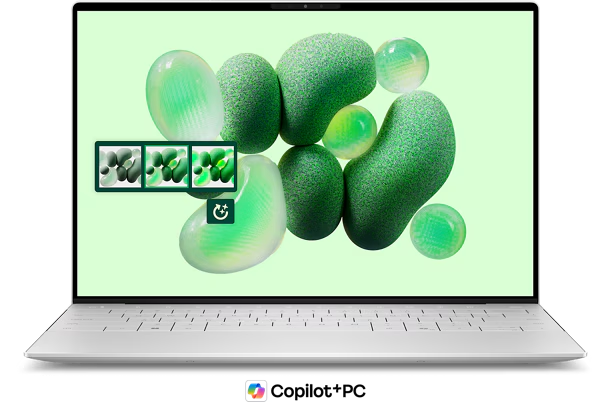
The Dell XPS 13 is a reliable choice for general home office use, offering a balance of performance, portability, and battery life. Its sleek design and excellent display make it a popular option among professionals.
For Creative Professionals
The Apple MacBook Pro is favored by creative professionals for its powerful performance, stunning Retina display, and robust software ecosystem. It’s particularly well-suited for tasks like video editing and graphic design.
For Budget-Conscious Buyers
The Acer Aspire 5 provides a solid performance package at an affordable price. It offers decent processing power and a comfortable keyboard, making it a great choice for budget-conscious buyers who need a reliable laptop for basic office tasks.
Takeaways
Choosing the right laptop for your home office is a decision that should be made with careful consideration of your specific needs and preferences. By evaluating the key features and specifications discussed in this guide, you can select a laptop that not only meets your work requirements but also enhances your overall productivity and comfort.
Remember, the best laptop for your home office is one that aligns with your professional needs, whether it’s powerful processing, a stunning display, or reliable battery life. Take the time to research and test different models, and you’ll be well on your way to creating an efficient and enjoyable home office setup.
For further information on how to optimize your tech setup for remote work, visit resources like The Verge’s home office guide to ensure you have everything you need for a successful remote work experience.
Need help with “The Ultimate Guide to Choosing a Laptop for Your Home Office: Features to Consider”?
Ready to upgrade your tech? 🚀 Visit Joo Computers today for quality laptops, desktops, accessories, and expert support. 📞 Call / WhatsApp: 0717 18 35 90 📍 Location: Moi Avenue, Elegant Exhibition Shop A5, opposite Bihi Towers Walk in, call us, or message us now — let’s get you sorted!
Need help with “The Ultimate Guide to Choosing a Laptop for Your Home Office: Features to Consider”? Ready to upgrade your tech? 🚀 Visit Joo Computers today for quality laptops, desktops, accessories, and expert support. 📞 Call / WhatsApp: 0717 18 35 90 📍 Location: Moi Avenue, Elegant Exhibition Shop A5, opposite Bihi Towers Walk in, call us, or message us now — let’s get you sorted!